Your sales team has hundreds of conversations every week. They are on the front line, uncovering customer pain points, handling objections, and agreeing on next steps.
But what happens after the call ends? Where does that valuable information go? Most of it is forgotten or lost in incomplete notes.
Stop Letting Deal Intelligence Disappear After Each Call
Every sales call contains a wealth of intelligence. When you lose that data, your team must rely on patchy notes and hazy memories. They also face the tedious task of manual CRM updates. This creates blind spots in your pipeline and costs you revenue.
Conversation analytics software solves this problem. It automatically captures, organizes, and analyzes the intelligence from every call.
Think of it as having your best analyst sit in on every meeting. The system records and transcribes, but more importantly, it understands each customer interaction.
The Core Problem This Software Solves
Spoken conversations are unstructured. A critical detail about a competitor or a budget confirmation might be mentioned briefly. Without a system to flag it, that detail is gone. Conversation analytics software turns unstructured talk into structured, reliable data.
For your team, this means:
No more frantic note-taking: Reps can focus completely on the customer, knowing every word is captured.
A single source of truth: All customer conversations are centralized and searchable. No more hunting for details across emails, Slack, and notebooks.
An end to tedious admin: The software can automatically push call summaries, key topics, and action items directly into your CRM. This frees up hours for reps to sell.
By automatically capturing and structuring call data, teams gain a perfect record of every commitment and objection. This transforms chaotic conversations into a predictable, manageable asset for the entire revenue team.
This automated workflow gives you complete, unfiltered visibility into your pipeline. As a sales leader, you can see what is actually happening on calls without shadowing them.
It provides a clear, data-backed picture of deal health, rep performance, and customer sentiment. Instead of relying on gut feelings, you know exactly where your deals stand and why. This shift from guesswork to data-driven insight is the biggest advantage of using conversation analytics software.
How Conversation Analytics Turns Talk into Actionable Data
A Zoom recording can update your CRM and create a clear set of next steps. This is not magic. It is a straightforward, three-step process that conversation analytics software handles automatically.
The goal is to let your sales team focus on talking to customers. The technology works in the background, connecting spoken words to the structured data your business needs. Let’s break down how it turns conversation into usable information.
Step 1: Automatic Transcription
The process starts by converting the conversation into text. After a call, the software transcribes the entire audio file. This is more advanced than basic speech-to-text. These platforms are tuned for business conversations, recognizing industry jargon, different accents, and who is speaking.
This transcript is the foundation for all analysis. Without a clean, accurate text version, any further analysis would be unreliable. To understand this step, it is helpful to know the basics of audio transcription. The transcript is the raw material.
Step 2: Contextual Understanding with NLP
Once the conversation is in text form, the software must make sense of it. This is where Natural Language Processing (NLP), a field of AI, is used. The software does not just scan for words; it reads the transcript to understand meaning, emotion, and context.
Think of it as an assistant who can read a 60-minute transcript in seconds and identify key moments. NLP determines who said what, assesses their sentiment, and sorts the conversation into logical topics. It understands the difference between a customer asking about pricing and a rep promising a follow-up. This is how raw text becomes intelligence.
The image below shows how this intelligence can be used to understand why a deal was lost, turning a negative outcome into a learning opportunity.
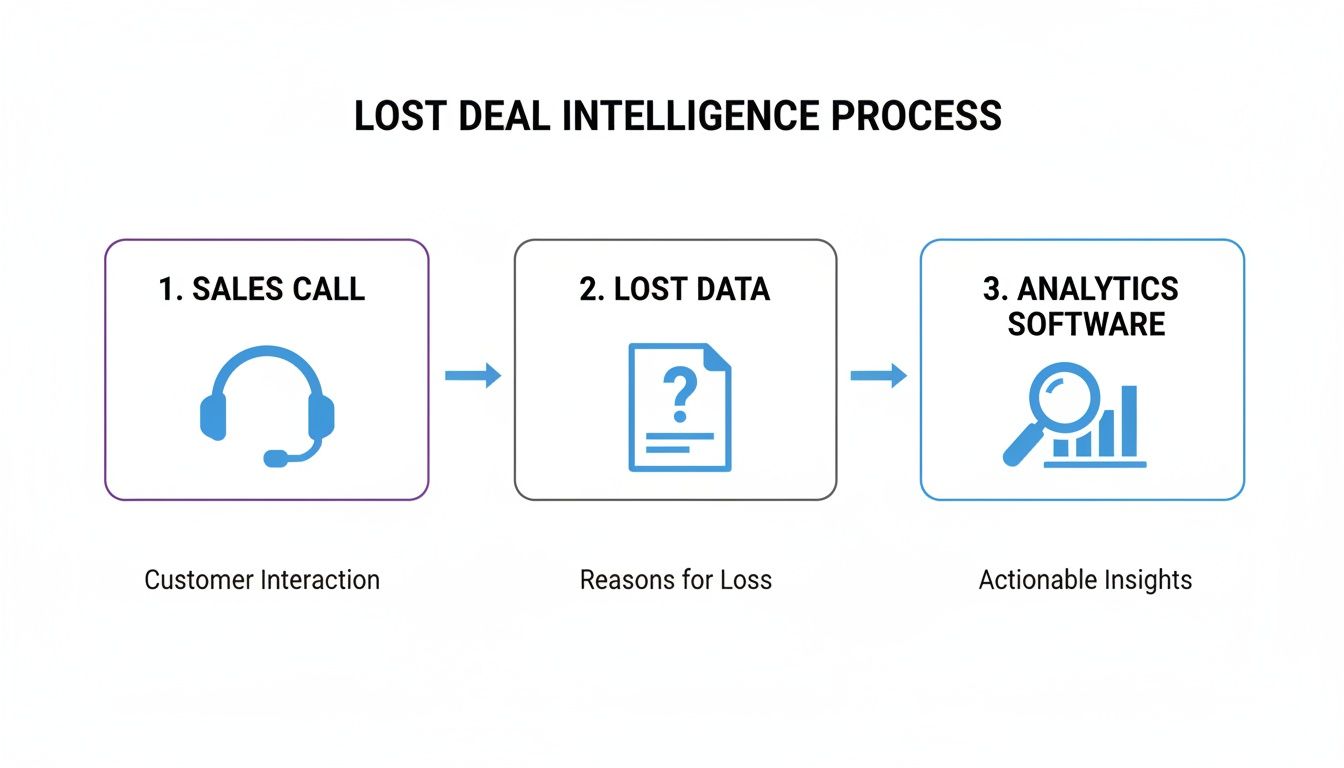
As you can see, call data is often lost. Analytics software captures it, analyzes it, and turns a lost deal from a dead end into a source of actionable insight.
Step 3: Critical Signal Extraction
The final step, signal extraction, unlocks the most value. Based on rules you define, the software finds and extracts the specific "signals" that are important to your business.
This is not generic analysis. You control what the software looks for.
Signal extraction is teaching the software what a "budget confirmation" or "competitor mention" sounds like in a real conversation. Once it learns, it flags these moments automatically in every call.
For example, you can set up a platform like Samskit to automatically spot and flag these signals from a sales call:
Action Items: When a prospect says, "Can you send me that proposal by Friday?", the system creates a task for the account owner.
Competitor Mentions: If a customer notes, "We're also looking at Competitor X," that information gets logged in your CRM.
Budget Confirmations: A phrase like, "We have a budget of £50,000 for this initiative," is captured as a key data point.
Feature Requests: A customer saying, "It would be great if your product could also do Y," gets routed to your product team as feedback.
This automated process ensures nothing critical is missed. The software organizes an hour-long conversation into a few structured data points. These points are ready to update your CRM, inform your strategy, and drive action. It turns talk into trackable results.
The Core Features That Drive Revenue Growth
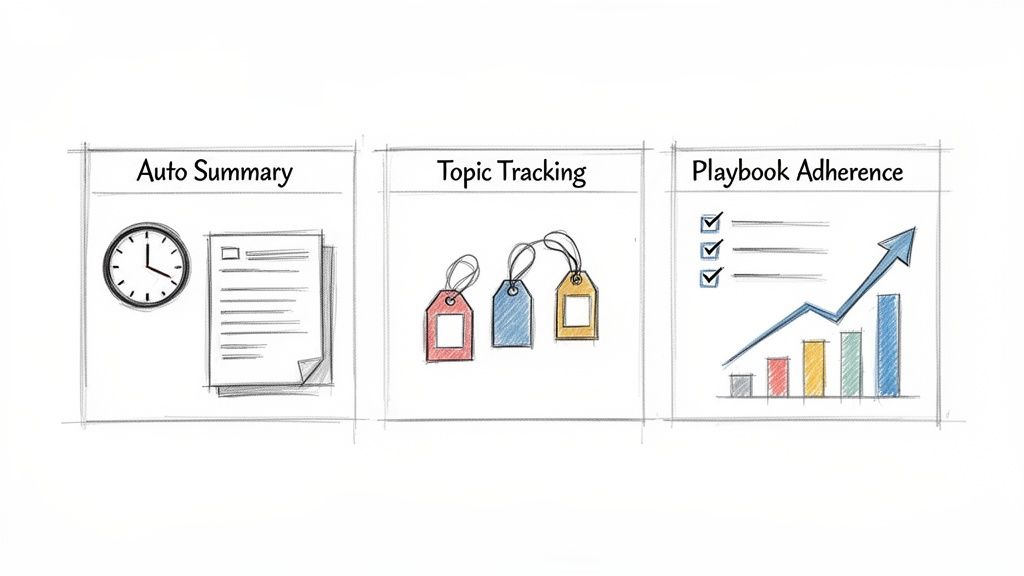
Basic transcription is just the starting point. The real power of conversation analytics software comes from features that turn customer conversations into measurable business outcomes. These are the workhorses that help sales and RevOps leaders increase revenue.
The objective is to automate tedious work, reinforce winning behaviors, and uncover competitive insights. Let's examine the functions that separate a simple recording tool from a platform that actively grows your business.
Automated Call Summaries
A rep finishes a day of calls and then spends another hour typing notes and updating the CRM. This is inefficient and a waste of selling time. Automated summaries eliminate this task.
The software uses AI to instantly generate a structured recap of each conversation. It pulls out key moments, action items, and customer commitments.
A rep gets a perfect summary in seconds, instead of spending 15 minutes trying to remember details. This not only saves time but also ensures that crucial context is captured accurately and consistently. The result is better data in your CRM and more time for your team to close deals.
This feature alone can reduce manual post-call admin work by 30-50%. For a sales manager, this means faster deal reviews based on evidence. You get a clear overview of every interaction without chasing reps for updates.
AI-Driven Topic Tracking
What if you could instantly find every call where a prospect mentioned a specific competitor last week? Or flag every conversation where a customer brought up "pricing"? AI-driven topic tracking makes this possible.
You define the keywords and phrases that matter to your business, such as competitor names, product features, or common objections. The software then automatically tracks them across all calls, meetings, and emails. These become searchable "trackers," like smart playlists for your customer conversations.
This capability helps you stay ahead of the market.
Competitive Intelligence: See how often competitors are mentioned in deals and hear what customers say about them in their own words.
Product Feedback: Track every mention of a feature request or customer pain point to give your product team unfiltered feedback.
Objection Handling: Analyze how your team handles objections around price or timing, and use those insights to refine coaching.
This gives you a direct pulse on market trends and team performance, using the customer's voice as the source of truth.
Playbook Adherence Analytics
You have invested in a sales playbook with proven talk tracks and discovery questions. But are your reps actually using it? Playbook adherence analytics provides the answer.
The software measures how consistently reps use key phrases from your sales methodology. You can see if they are asking the right qualifying questions, framing the value proposition correctly, or using approved language for objections.
This creates an objective, data-backed way to measure and coach your team. Instead of guessing, you get a clear report showing which reps are following the playbook and which ones need more support. This leads to more consistent messaging, faster ramp times for new hires, and a more predictable sales process.
This feature ensures your best practices are put into practice. The rapid growth of Brazil's big data analytics market, projected to hit USD 11.62 billion by 2031, highlights this trend. With software claiming over half the market share, platforms like Samskit are becoming critical for analyzing call intent and deal risks to automate CRM updates in systems like HubSpot or Salesforce. This data-driven approach is how modern revenue teams gain a competitive edge.
How Conversation Analytics Powers Your Entire Revenue Team
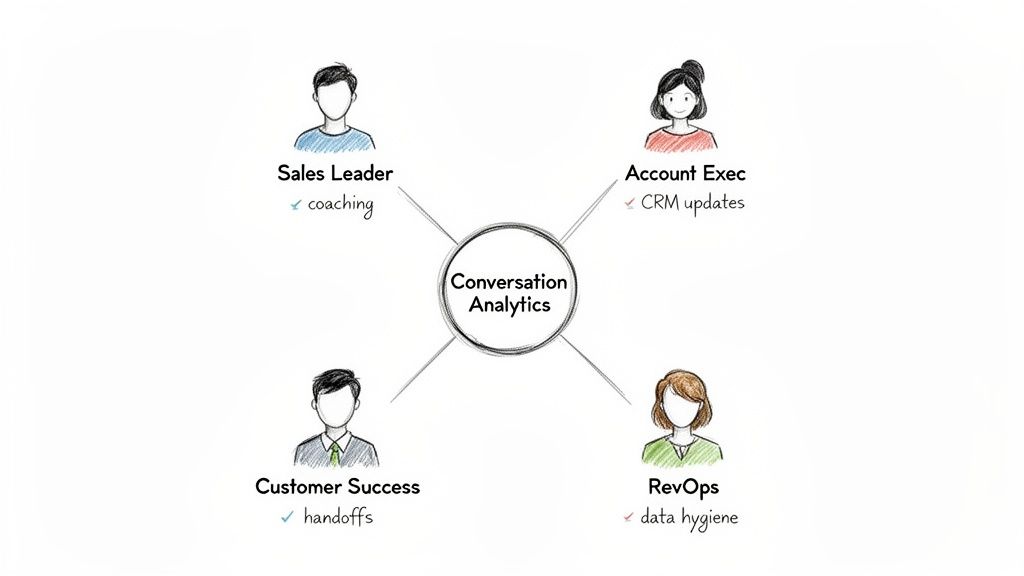
The value of conversation analytics extends beyond helping one salesperson. It creates a single source of truth that connects your entire revenue organization. When every department works from the same information, the customer journey is seamless.
This is not just another tool. It is a practical solution to daily frustrations for each person on your team. It helps break down silos and aligns everyone around what the customer actually said and wants.
For Sales Leaders
As a sales leader, you aim to build a predictable revenue engine. Forecasting often relies on a rep's gut feeling, and coaching is subjective. Conversation analytics software replaces this guesswork with a clear, data-backed view of your pipeline.
Coach with precision. Instead of generic advice, you can go to the exact moment in a call where a rep struggled with an objection. You can create a library of your top performer's calls to show the team what success looks like.
Forecast with confidence. The software flags deal risks that reps might miss or downplay. If a prospect repeatedly mentions "budget issues" or a competitor, the system surfaces it. This gives you a more honest view of your pipeline's health.
This is a fundamental change. You move from questioning reps in deal reviews to collaborating with them based on objective facts. Coaching sessions become productive, data-driven strategy meetings.
For Account Executives
For an Account Executive (AE), time is money. Every minute spent on notes and CRM updates is a minute not spent selling. Conversation analytics gives those hours back and provides a perfect, searchable memory of every interaction.
Eliminate busywork. After a call, the software automatically drafts and syncs summaries, action items, and customer details to the CRM. This automation can free up hours each week.
Never forget a promise. An AE can instantly search for any commitment made, such as a specific price promised weeks ago or a technical question that needed a follow-up. This ensures nothing is missed and builds trust with the buyer. A good AI note-taking app powers this automation.
In a growing market like Brazil's web analytics sector—projected to hit USD 550.05 million by 2034—connecting customer data is critical. You need to know what customers say, not just what they click. Conversation analytics bridges this gap. Platforms like Samskit extract commitments and concerns from call transcripts and sync them to CRMs like Pipedrive or Zoho. With mobile commerce driving 53% of transactions, this unified view is essential. Learn more about these market trends and their impact on data analytics.
For Customer Success and Revenue Operations
The customer journey continues after the deal is signed. A smooth handoff and clean data are vital for customer retention and business efficiency.
For Customer Success Managers (CSMs): A CSM should not start a new relationship without context. Conversation analytics gives them a complete, searchable history of every promise made and priority discussed during the sales cycle. CSMs can deliver on expectations from day one, reducing the risk of customer churn.
For Revenue Operations (RevOps): The RevOps team manages the data that fuels the organization. This software simplifies their job by enforcing data hygiene. It ensures every call is logged and every CRM field is updated automatically. This provides RevOps with the clean, structured data needed for accurate reports and dashboards.
How to Choose and Implement the Right Software
Choosing the right software and ensuring your team uses it is critical. The best tool is useless if it is difficult to use or produces poor data.
Stop thinking about buying a "tool." Instead, focus on the specific problem you need to solve. Is your CRM data messy? Is your sales coaching based on guesswork? Are you losing deals to competitors? Start with the problem before you look at demos.
The Buyer’s Evaluation Checklist
It is easy to be impressed by feature lists and dashboards in a sales pitch. Focus on three critical areas that determine if the software will help your team sell more.
How Good is the Transcription, Really?: Everything depends on transcription accuracy. If the software cannot understand your industry’s jargon or different accents, the system is useless. Ask vendors for accuracy benchmarks and test it with your specific terminology. A tool that mishears "budget" as "biscuit" is not helpful.
Does it Truly Integrate with Your CRM?: A deep integration does more than just link a call recording in a Salesforce or HubSpot activity. A real integration automatically finds key information like budget, timeline, and decision-makers and maps them to the correct fields in your CRM. It should work with your specific sales stages, not a generic template.
Is it Built for Humans?: If the platform adds extra work for a rep, they will not use it. The user experience must be simple. For reps, it should automate notes and sync data without them thinking about it. For managers, it must be intuitive, allowing them to find coachable moments and build feedback playlists in minutes.
A Proven Game Plan for Implementation
Rolling out new software is a campaign, not a one-day event. You need to build momentum and prove its value. Avoid a "big bang" launch where you turn it on for everyone at once.
Start with a pilot program. Select a small group of reps, including top performers and motivated middle-of-the-pack reps. This allows you to fix issues and create internal champions who can promote the software.
Your goal with the pilot is to find one clear win. It could be something simple, like, “Our pilot team saved an average of 3 hours per week on CRM admin.” Or a larger metric, such as, “We boosted our discovery call qualification rate by 15%.”
Once you have a result, you have a story. That story is more powerful than a top-down mandate from leadership.
Here is a step-by-step rollout plan:
Tune it to Your Business: Work with the vendor to configure the software. Define the keywords and phrases ("trackers") you need to monitor, such as competitor names, product features, and budget objections. This ensures the insights are relevant from day one.
Build Smart Dashboards: Create dashboards for managers that answer their most important questions. A "Competitor Mentions" board or a "Pricing Objections" tracker can help them focus on what matters.
Train for the Workflow, Not the Features: Training should focus on "what's in it for me?" Show reps how it reduces their administrative work. Show managers how it makes their 1:1s more effective. If you want to improve your team's entire process, you can find more options among these sales intelligence tools.
Listen, Tweak, and Improve: The launch is not the end. Check in with the team regularly. What is working? What is not? Use their feedback to refine your dashboards and trackers. A successful implementation is an ongoing process.
Justifying another software purchase can be difficult. To prove its value, focus on the direct impact on your team’s performance and your bottom line.
This is an investment in a smarter, more predictable revenue engine. To get approval, you need to connect the software's features to the numbers that matter to leadership.
Key Indicators for Tangible ROI
When building your business case, focus on the operational and financial metrics the software directly improves. Concentrate on hard numbers that show a clear return.
Seller Productivity Gains: Think about the hours your reps lose to manual tasks. By automating CRM updates and call summaries, the software gives that time back. A rep saving three hours a week gains nearly a full month of selling time each year. What could your team do with an extra month?
Increased Pipeline Velocity: How long does it take to close a deal? When reps can instantly recall every promise and share specific call clips, deals move faster. Shaving even 10% off a 90-day sales cycle is a significant win.
Higher Quota Attainment: Track software adoption against performance. You will likely see that your top reps, who consistently hit their quota, are the ones who use the platform regularly to review calls and follow the playbook.
The most powerful argument is a direct link between your team using the software and hitting their numbers. When your top performers are your most active users, it is clear the platform drives the right behaviors.
The Softer Benefits with Hard Financial Impact
Beyond the immediate numbers, other benefits have a serious financial impact. These are important points for your business case.
Faster New Hire Ramp Time: Onboarding new reps is expensive. You can give them a library of your best reps' calls from day one. They will learn winning talk tracks in weeks, not months, and become productive much faster.
More Effective Coaching: Vague feedback is not helpful. Imagine pointing to the exact 30-second moment in a call where a deal went wrong. This makes every one-on-one a focused, high-impact coaching session. Better coaching leads to better results, happier reps, and lower turnover.
The market is already adopting this technology. In Brazil, for example, the contact centre analytics market is valued at USD 84.0 million in 2024 and is growing fast. This growth is driven by companies seeking tools like Samskit that turn call data into actionable insights. By automating manual updates in platforms like Salesforce and HubSpot, some Brazilian firms have shortened their deal cycles by 20-30%. You can explore the research on Brazil's growing analytics market to learn more about these trends.
Frequently Asked Questions
When considering new technology, it is good to be skeptical. You have questions and deserve straight answers. Let's address some of the most common ones.
How Is My Customer Data Kept Private and Secure?
This is the first question everyone should ask. Your customer data is extremely valuable.
Any reputable conversation analytics platform is built with security as a priority. They must comply with regulations like GDPR in Europe and LGPD in Brazil. This means your call data is encrypted both during transit and when stored on servers.
Look for providers that offer smart data redaction. This feature automatically finds and removes sensitive personal information, like credit card numbers or home addresses, from both the audio and the transcripts. This is essential for compliance.
What About Different Languages and Accents?
You might have a team member with a strong accent and a client from a different region. Will the software understand them?
The transcription engines in today's top platforms are very sophisticated. They are trained on vast global datasets, so they can handle a wide range of languages, dialects, and accents with high accuracy. The only way to be sure is to test it. Ask a potential vendor to run a test on a few of your own call recordings to see how it performs with your team’s speech patterns.
Isn’t This Just Another Call Recording Tool?
No. It is important to understand the difference. Comparing this to call recording is like comparing a calculator to a supercomputer.
Basic call recording is a passive library. It saves audio files for you to review later.
Conversation analytics software is an active intelligence engine. It doesn’t just store the call; it transcribes it, understands the context, and automatically flags business-critical moments like competitor mentions, budget approvals, and next steps.
Here is a better way to think about it:
Call Recording: A digital archive. The information is there, but you have to find it yourself.
Conversation Analytics: An analyst who listens to every call and provides a concise brief on everything you need to know.
The goal is not just to have the recordings. It is to make the intelligence inside them structured, searchable, and useful for your entire revenue team. It turns background noise into a strategic advantage.
Ready to stop letting deal intelligence disappear? Samskit turns your customer conversations into reliable CRM updates and clear next steps, freeing your team to focus on what matters most—selling. See how it works.